
 By kp4coder
Sync Post With Other Site Plugin
Allows user to sync Posts, Pages and Custom Post Type with multiple websites.
Allows user to sync Posts, Pages and Custom Post Type with multiple websites.
If you run multiple websites and want to synchronise them automatically and securely for specific post operations, then Sync Post With Other Site is the plugin to use.
You just need to enter website URL & login credentials of other website to sync the post from there.
OVERVIEW
This plugin adds the following major features to WordPress:
admin page: a “Sync Post” menu to manage remote sites.
Import and Export: Connected sites’ present posts base can be synchronised manually thanks to the provided import/export tool.
Installation
Install Via WordPress Uploader : In your WordPress admin, go to Plugins > Add New > Upload and upload the available ZIP of Sync Post With Other Site to install the Plugin.
Manual Installation :
Download the latest version of the Sync Post With Other Site.
Unzip the downloaded file to your computer.
Upload the /SyncPostWithOtherSite/ directory to the /wp-content/plugins/ directory of your site.
Activate the plugin through the ‘Plugins’ menu in WordPress.
Screenshots
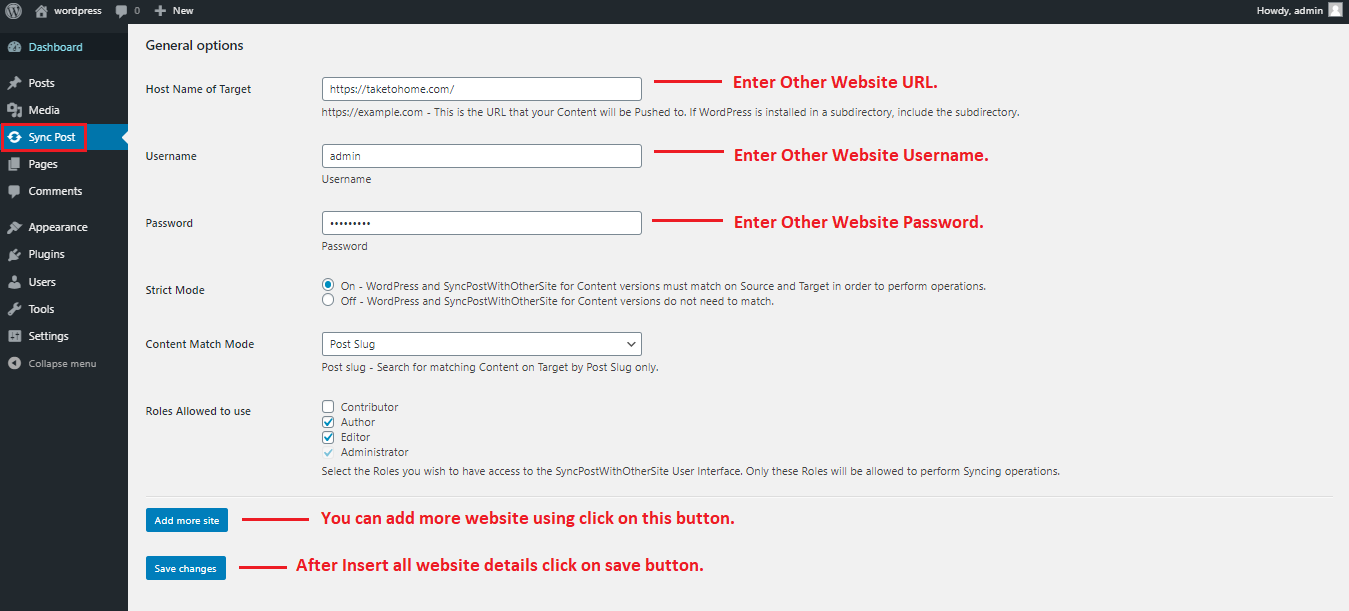
Setting Page
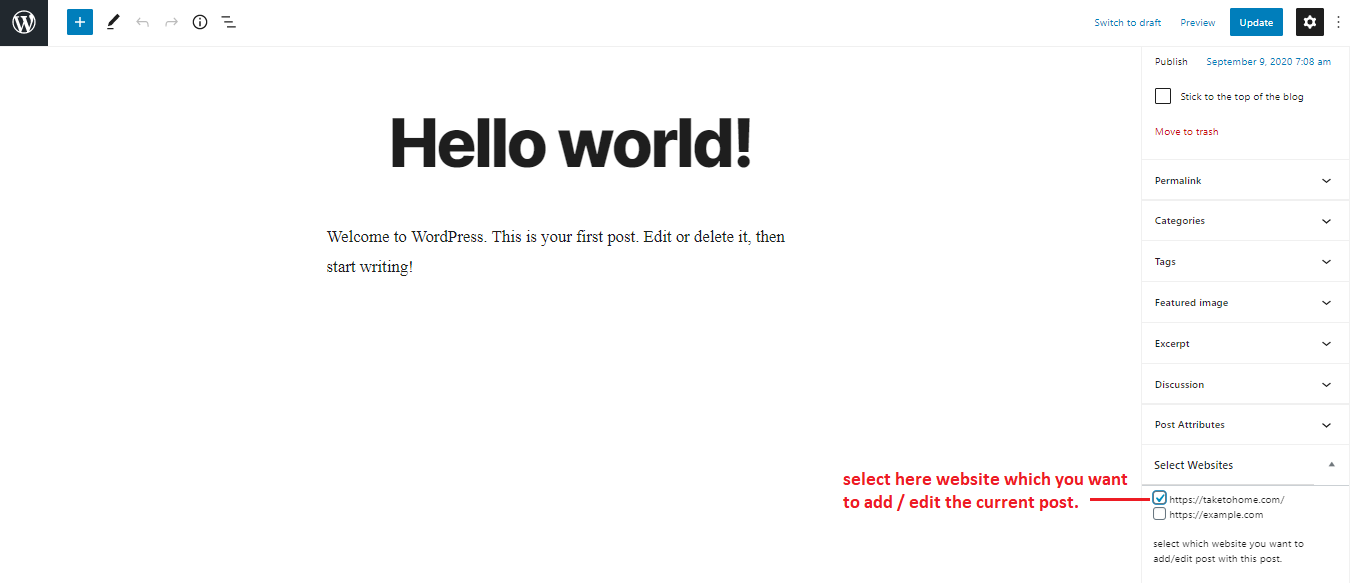
Post Add / Edit Select Website.
FAQ
Yes! The SyncPostWithOtherSite for Content needs to be installed on the local or Staging server (the website you’re moving the data from – the Source), as well as the Live server (the website you’re moving the data to – the Target).
Yes, As long as the sites can reach every other, WP Remote User Sync will do the job.
This implies that two sites in localhost can convey. But if one of those sites is on localhost and the other one isn’t, token exchange can’t occur and the sites won’t have the ability to communicate.
No. WPSiteSync for Content will just synchronize with the one Post content which you’re editing. And it is going to only Synchronize the content once you let it. This Permits You to control Just What content is transferred between sites and when It’ll Be transferred
Changelog
1.1.0 – Jan 10, 2021
- Enhancement: Sync Category and Tags with Post. ( Thanks zfbd. )
1.2.0 – Jan 18, 2021
- Enhancement: Sync Custom Post Types and Pages. ( Thanks iu7489, moshe and anthov50000. )
1.2.1 – Jan 19, 2021
- Fix: While Custom Post Types edit on main site then post added on other sync site instead of update post.
1.2.2 – Feb 27, 2021
- Enhancement: Sync Custom taxonomy with post. Like Category, Tags, Product Category, Product Tags.
1.2.3 – Mar 06, 2021
- Fix: Gutenberg editor blocks and HTML tags are carried over to other site. ( Thanks lisaburger. )
1.2.4 – April 11, 2021
- Fix: Post meta senitize field data. ( Thanks lisaburger. )
- Enhancement: Sync post content images to other server. ( Thanks ale8521. )
1.3 – May 15, 2021
- Fix: Strict mode.
1.3.1 – Oct 01, 2021
- Fix: Featured Image Update.
1.3.2 – Feb 08, 2022
- Enhancement: by default selected website.
1.4.0 – Jun 13, 2022
- Fix: post published error solved.
1.4.1 – Jul 24, 2022
- Fix: IFRAME issue.
- Fix: Sync the corrent parent post.
1.4.2 – September 27, 2023
- Fix: small errors
1.5.2 – April 03, 2024
- Fix: Security Update
1.5.3 – May 30, 2024
- Fix: Send data using API, Security Update