

RR Fictitious Payment for WooCommerce Plugin
Adds a fictitious payment gateway to WooCommerce available only for administrators to test or verify the checkout process
Adds a fictiv payment gateway to WooCommerce available only for administrators to test or verify the checkout process.
Can be used safely in a real-world environment (because this feature is only available to the administrator).
Useful for testing the order process as a whole (when setting up the store or other plugins) or for orders placed by phone/email and paid live.
With RR Fictitious Payment for WooCommerce, the payment is considered to be made (unlike payments by transfer or check which place the order “pending payment”).
- The plugin can only be activated if WooCommerce is installed and activated.
- The payment method can be enabled / disabled within WooCommerce: WooCommerce> Settings> Payments
- The payment method is visible and accessible only to administrators.
- Orders paid via RR Fictitious Payment are considered paid, with status “In progress” (wc-processing, which triggers the linked operations: emptying the basket, sending mail, reducing the stock, etc.).
- The plugin settings page allows you to define a text “Instructions” and to configure if these instructions are to be added on the thank you page and / or emails.
- An internal traceability note is added to the order: Order placed by admin “xxx” and paid via RR Fictitious Payment.
** Supported Languages **
* English
* French
Localization
- English
- French
Installation
Follow the usual routine;
- Open WordPress admin, go to Plugins, click Add New
- Enter “Fictitious Payment” in search and hit Enter
- Select the Fictitious Payment plugin and click “Install Now”
- Activate & click on Settings links
Screenshots

The checkout Fictitious Payment method

Fictitious Payment Gateway

The Fictitious Payment Settings with optional instructions for Thank-you page / e-mail
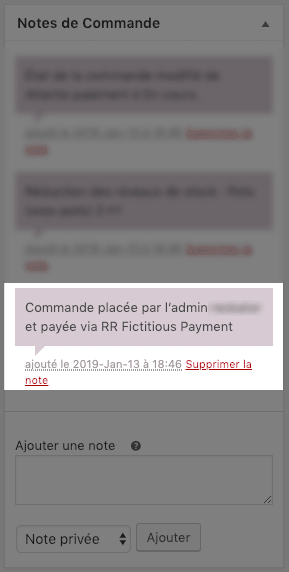
Private Note in order detail

Fictitious Payment Plugin with settings link

WooCommerce requirement
FAQ
Only administrators have access to this payment method.
Yes, these orders include a private note “Order placed by the admin xxxx and paid via RR Fictitious Payment”.
Changelog
1.2.1 – 2023-10-11
- Fix Declaration WP Tested up to
- Add Declaration WC Tested up to
1.2.0 – 2023-10-10
- New: Add Compatibility declaration with WooCommerce HPOS
- Tested up to WooCommerce 8.1
1.1.8 – 2022-11-16
- Improved plugin description
- Adding plugin keywords
- Check for 7.1.0 WooCommerce support
1.1.7 – 2022-11-01
- Security: removing all empty index.php
- Edit plugin description and add keywords
- Check for 7.0 WooCommerce support
- Check for 6.1 WordPress support
1.1.6 – 2022-01-21
- Adding keywords for Tags (readme.txt)
- Check for 6.1.x WooCommerce support
1.1.5 – 2021-12-16
- Check for 6.0 WooCommerce support
1.1.4 – 2021-08-19
- Check for 5.6.x WooCommerce support
- Check for 5.8 WordPress support
1.1.3 – 2021-06-09
- Check for 5.4.x WooCommerce support
1.1.2 – 2021-03-04
- Check for 5.x WooCommerce support
1.1.1 – 2021-01-13
- Check for 4.x WooCommerce support
1.1.0 — 2019-10-23
- Add WC requires at least mention
- Add WC tested up to mention
- Check for css new rules WP 5.3
1.0.0 – 2019-01-13
- Initial build