
 By Premmerce
Premmerce Product Filter for WooCommerce Plugin
The Premmerce Product Filter for WooCommerce plugin is a professional tool for managing filters with perfect Ajax and unique SEO features.
The Premmerce Product Filter for WooCommerce plugin is a convenient and flexible tool for managing filters for WooCommerce products. Among the main features of this plugin there is a single widget that manages the display of all available filters, perfect Ajax, working with all popular themes and unique SEO features.
Also, comparing to the standard WooCommerce filters, the Premmerce Product Filter for WooCommerce has a well-thought-out caching system for the load speed improvement.
The only plugin you need to manage your WooCommerce Filter
Fastest product filter for WooCommerce
Comparing to the standard WooCommerce filters, the Premmerce Product Filter for WooCommerce has a well-thought-out caching system for the load speed improvement.
We recommend that you look through the following research:
The comparison of the load speed of the WooCommerce filters and Premmerce Product Filter for WooCommerce with the cache plugins
Single widget for all filters
Displaying all available filters using a single widget
Filter the search results
An option to filter the search results
Displaying only available attributes
Displaying only available attributes depending on the category
All you need filters in one solution
Filter by price, active filters widget, filters widget included
Deferred loading
Optimize page load speed by loading filter deferred
Ajax filtering
Possibility to load filtering results with Ajax
Colors and Labels (Premium)
Possibility to show filter like colors and labels
Custom taxonomies (Premium)
You can use any custom taxonomy for filtering your products
The only Filter Plugin that have all you need SEO Settings
Generating pages with the Clean URL
Generating pages with the Clean URL based on the selected category + brand + attribute (you can specify an unlimited number of attributes)
Creating landing pages based on filters (Premium)
Premmerce Product Filter for WooCommerce Premium allows you to create landing pages based on the choice of filter configuration. The rule that generates these pages consists of the following elements:
Category (you can choose any category in the store for which the attributes are assigned) + Brand (if our Premmerce WooCommerce Brands plugin is activated) + Product Attribute / Attributes (you can choose any number of attributes and their terms).
This way you’ll create landing pages for already filtered pages of products with a specified category, brand, and attributes. For example, the following pages can be created:
Smartphones (category) + Apple (brand) + 7S (attribute) + Gold (attribute) + 64 Gb (attribute)
And for this page you can specify a unique h1, title, meta description and SEO-text.
Bulk generation of landing pages (Premium)
If you have many categories, brands, and product attributes in the store, it’s quite challenging to create unique descriptions of all possible options of categories + brands + attributes.
However, in order to get as many pages of your store as possible available in the search result, you can still generate a number of pages with Clean URL and unique titles.
Automatic adding of pages to the Sitemap (Premium)
After the category filters optimization, it is important to let the search crawlers know that now you have many more landing pages than before. So, when you create a page based on filters either manually or automatically, the plugin automatically adds new pages to the Sitemap, which is generated by the Yoast SEO plugin.
Themes’ Support
The plugin supports all most popular WooCommerce themes as we’ve optimized styles to fit the most popular solutions, provided a filter style “turn off” option in order to enable the styles of the chosen theme.
We’ve tested The Premmerce WooCommerce product filter with the following themes:
- SalesZone
- GoodLook
- GrandStore
- OceanWP
- Avada
- Flatsome
- Divi
- Neto
- Astra
- Mesmerize
- Shop Isle
- Hestia
- Mins
- Primer
- Storefront
Plus, this plugin has really flexible settings, which ensures its smooth performance with any another theme, that hasn’t been mentioned in the list above.
Read more about: Premmerce Product Filter for WooCommerce Premium
Demo
You can see how it works on the Storefront theme here: https://storefront.premmerce.com/electronics/mobile/ .
You can see how it works on the SalesZone theme here: https://saleszone.premmerce.com/electronics/mobile/ .
Plus, you can create your personal demo store and test this plugin together with Premmerce Premium and all other Premmerce plugins and themes developed by our team here: Premmerce WooCommerce Demo.
This plugin is 100% compatible with
- WooCommerce
- Premmerce WooCommerce Brands
- Premmerce Search
- Yoast SEO
Screenshots
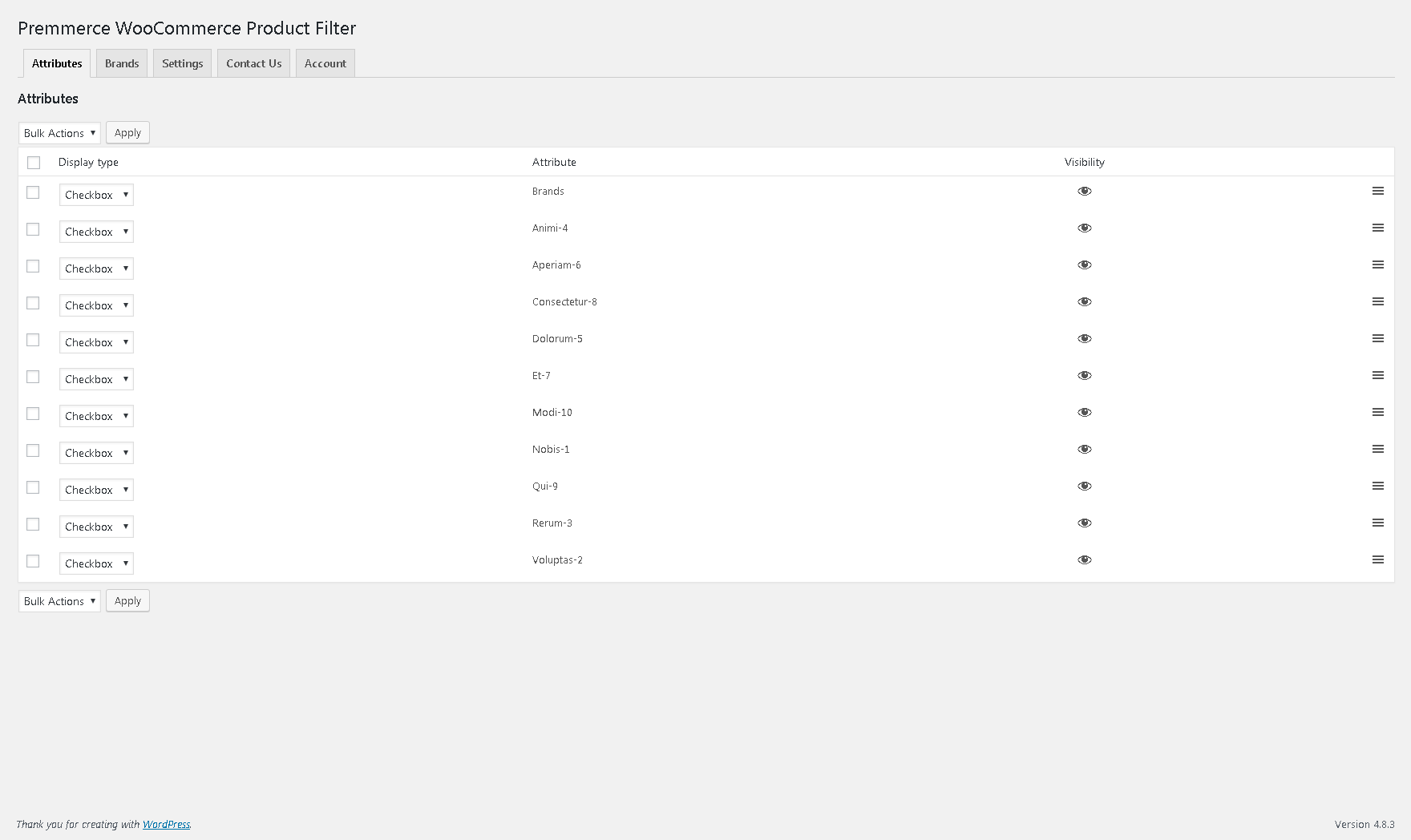
The filter widget settings;
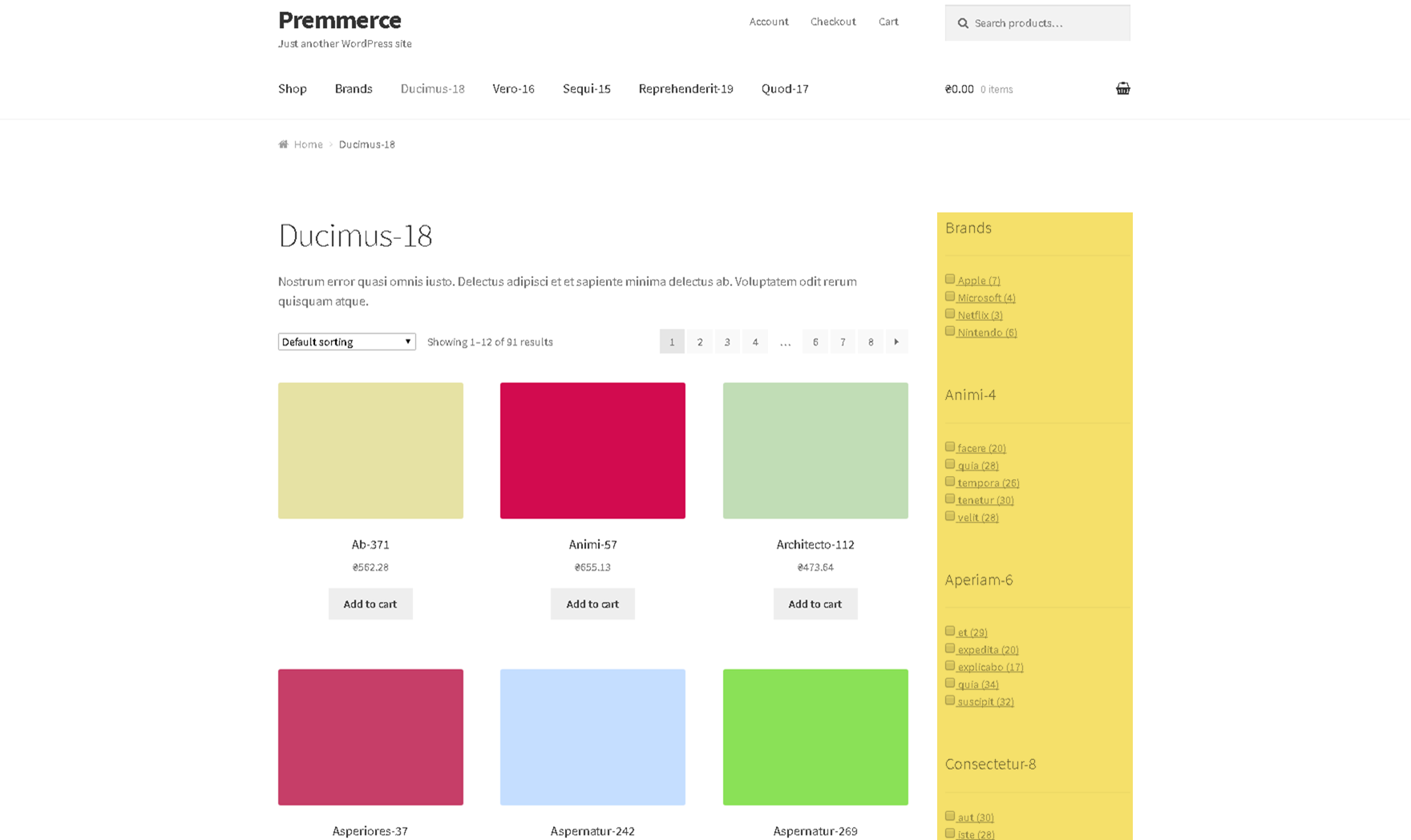
The filter displaying on the product category page;
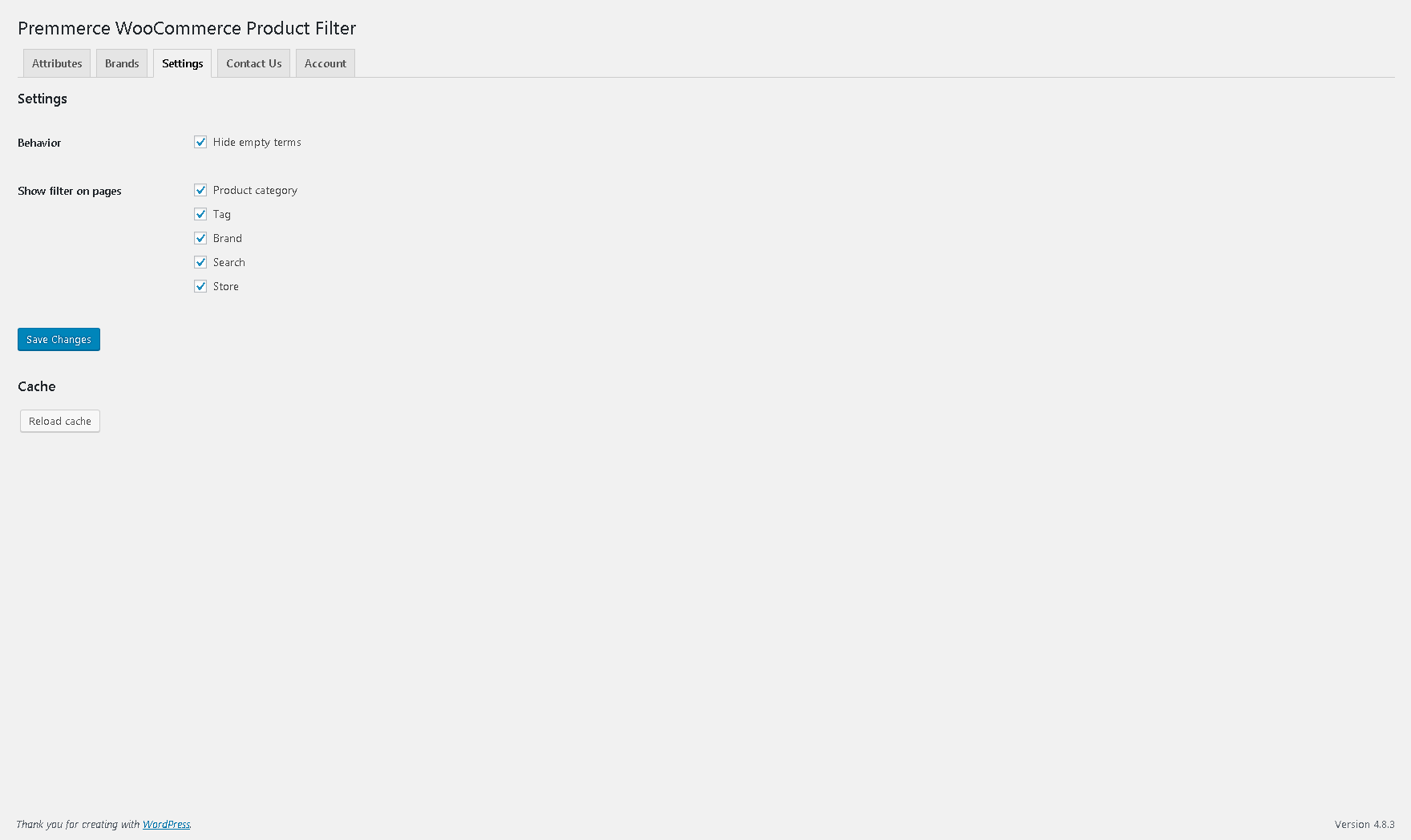
The plugin settings in the administrative area.
FAQ
Full documentation is available here: Premmerce Product Filter for WooCommerce
Go to Plugins -> Add New section from your admin account and search for Premmerce Product Filter for WooCommerce.
You can also install this plugin manually:
- Download the plugin’s ZIP archive and unzip it.
- Copy the unzipped premmerce-woocommerce-product-filter folder to the /wp-content/plugins/ directory.
- Activate the plugin through the ‘Plugins’ menu in WordPress
Please report security bugs found in the source code of this plugin through the Patchstack Vulnerability Disclosure Program. The Patchstack team will assist you with verification, CVE assignment, and notify the developers of this plugin.
Changelog
3.7.3 (8th April 2024)
- Security Fix: Broken Access Control on Cache clear action (Thanks to Patchstack for the report)
3.7.2 (20th July 2023)
- Security: Freemius SDK updated to 2.5.10
3.7.1
Release Date: Apr 11, 2023
- New: Compatibility with PHP 8.1
- New: Compatibility with WordPress 6.2
- New: Compatibility with WooCommerce 7.5.1
- Fix: Price filter scroll now working on mobile devices
- Fix: Category tags for the SEO rule attributes now rendering correctly
- Fix: PHP notice now not thrown when saving SEO rule without any terms selected
- Fix: Scripts now not loaded on every page
- Fix: Updating SEO rule now not adding whitespace to the description
- Fix: Uncaught ArgumentCountError: array_merge() does not accept unknown named parameters
3.7
Release Date: Jul 19, 2022
- New: Compatibility with the YITH WooCommerce Brands plugin
- New: ‘Disable nofollow on active filter links’ setting to turn off nofollow on active filter links
- Improvement: Reset Filter URL now has trailing slash
- Improvement: Enable permalink notice now with more clarity and link to turn them on
- Improvement: Clearing cache now shows success message
- Fix: Filter button now working on all installs
- Fix: AJAX filtering now working on all installs
- Fix: ‘Hide empty terms’ setting now working correctly for taxonomies
- Fix: SEO filter rules sitemap no longer 404s
- Fix: Upsell banner appearing even if premium version installed
- Fix: WordPress database error now not showing if no products are on sale
- Fix: WordPress database error now not showing when saving SEO rules
3.6.2
Release Date: Mar 3, 2022
- Update – Freemius to 2.4.3 version
3.6.1
Release Date: Jun 20, 2022
- Update – WooCommerce compatibility version to 6.1.0
- Update – WordPress compatibility version to 5.8.3
3.6
Release Date: Nov 18, 2021
- Add – Gutenberg block for filter
- Fix – Small bugs
3.5.7
Release Date: Sep 2, 2021
- Add – New Languages: Add new languages: German, French
- Fix – Bug in widget
3.5.6
Release Date: Jul 29, 2021
- Add – Affiliate Program
3.5.5
Release Date: Jul 1, 2021
- Add – Bundles and Save
- Add – Canonical generation for Seo Rules regarding Permalinks settings
- Fix – Bugs in Seo Rules and another small bugs
3.5.4
Release Date: Jun 24, 2021
- Add – Spanish Translation
3.5.1 – 3.5.3
- Fix – Small bugs
3.5
Release Date: May 27, 2021
- Add – Support for All In One Seo Plugin (Premium only)
- Add – Support for Rank Math Seo Plugin (Premium only)
- Add – Customization Fields for Premmerce Filter Widget (Premium only)
- Add – Customization Attributes for Shortcodes (Premium only)
- Add – New “Display as”: Hoverable Dropdown (Premium only)
- Add – Custom CSS field
- Add – Preloader for Filter when option “Load deferred” is turn on
3.4
Release Date: Mar 20, 2021
- Add – On Sale Filter (Premium only)
- Add – In Stock Filter (Premium only)
- Add – Rating Filter (Premium only)
- Add – Image Field Type for Attributes (Premium only)
- Add – functionality “Discourage Search Engines” for all filter pages or for each Seo Rule (Premium only)
- Add – Shortcode [premmerce_filter] – for showing main Premmerce Filter (Product attributes filter)
- Add – Shortcode [premmerce_active_filters] – for showing main Premmerce active filters (Product attributes active filters)
- Add – Show Premium features in Free version
- Fix – pagination in Premmerce filter setting page for Taxonomies tabs
- Fix – bugs with WPML, PolyLang, YoastSeo
- Update – Freemius to 2.4.2
3.3.2
Release Date: Dec 24, 2020
- Update Freemius to 2.4.1
3.3.1
Release Date: May 25, 2020
- Fixed bugs and improved compatibility
3.3.0
Release Date: Apr 22, 2020
- Added hierarchy to category filter
- Added filter button to widget
- Fixed displaying of filter on home page
- Updated WooCommerce compatibility to 4.0.1
- Updated WordPress compatibility to 5.4
- Updated Freemius to 2.3.2
3.2.5
Release Date: Sep 16, 2019
- Updated WooCommerce compatibility version to 3.7
3.2.4
Release Date: Jun 20, 2019
- Update deferred filter widget container & replace logic
- Updated Freemius to 2.3.0
- Updated Premmerce SDK to 2.1
- Updated WordPress compatibility version to 5.2
3.2.3
Release Date: Apr 25, 2019
- Updated WooCommerce compatibility version to 3.6
- Fixed trailing slash in sitemap
- Fixed sitemap pagination
- Fixed deferred filter widget title
3.2.2
Release Date: Mar 14, 2019
- Fixed running without woocommerce issue
- Fixed uninstall issues
3.2.1
Release Date: Mar 12, 2019
- Fixed custom taxonomies priority issue
3.2
Release Date: Mar 1, 2019
- Added attributes pagination
- Added OceanWP compatibility
- Updated drag-and-drop logic
- Updated freemius to 2.2.4
- Fixed filter loading on pages without filter
- Security fix
3.1.2
Release Date: Nov 29, 2018
- Added WooCommerce 3.5 support
- Added Reset all button
- Fixed prices in filter when currency(Premmerce Woocommerce Multi-currency) switched
3.1.1
Release Date: Oct 22, 2018
- Fixed Seo Sitemap namespace
3.1
Release Date: Oct 19, 2018
- Added styles configuration
- Added deferred loading
- Added ajax results loading
- Added custom taxonomies to premium version
- Updated themes support
- Improved performance by caching price query results
3.0.1
Release Date: Aug 7, 2018
- Fixed display_type notice
3.0
Release Date: Aug 2, 2018
- Added slider to premium version
- Added category filter
- Added product tag filter
- Added WPML multicurrency support
- Fixed same filter item as queried object is no longer visible
- Fixed seo rules translations with WPML
- Fixed attribute settings with WPML
- Fixed min and max price variables in seo rule
- Improved plugin architecture
2.1
Release Date: Jun 21, 2018
- Fixed properties with value 0
- Fixed active filters
- Fixed price filter form action in multisite environment
- Fixed attributes parsing
- Removed freemius menu subitems
2.0
Release Date: Jun 7, 2018
- Added permalinks to premium version
- Added seo settings to premium version
- Added filter type color to premium version
- Added filter type label to premium version
- Added filter widget to attribute archive page
1.1.1
Release Date: Apr 23, 2018
- Updated markup and styles for better themes compatibility
1.1
Release Date: Apr 19, 2018
- Added Active Filters widget
- Added Price filter
- Added Scroll and Dropdown views
- Fixed search query
- Fixed filters nested category products
- Improved performance
1.0.4
Release Date: Feb 02, 2018
- Added WooCommerce 3.3.0 support
- Updated translations
1.0.3
Release Date: Jan 24, 2018
- Updated freemius sdk
- Fixed the dependency check on multisite
- Fixed “Clear cache” button
1.0.2
Release Date: Dec 06, 2017
- Added Premmerce icon to menu
- Added Premmerce version check
- Added WordPress 4.9.1 support
- Added WooCommerce 3.2.5 support
1.0.1
Release Date: Nov 20, 2017
- Added WordPress 4.9 support
- Added WooCommerce 3.2.4 support
1.0
Release Date: Oct 19, 2017
- Initial release