
![Clinton [CreatorSEO]](https://ps.w.org/collapse-magic/assets/icon-256x256.jpg?rev=3097363)
Collapse Magic (CLAPS) Plugin
NEW! Read-more / read-less text accordion with text fade to control the way that content is displayed on the page.
Collapse Magic provides an easy way to display (collapsible) read-more text on a page. This plugin is an alternative to other plugins like collapse-o-matic and can be used as a direct replacement without the need for any changes to page content.
Features
- Easy to implement
- Configurable expand and collapse titles
- Configurable up and down arrows
- Adjustable visible text height in the collapsed state
- Adjustable fade out text visible in the collapsed state
Background
Collapse Magic provides an easy way to display (collapsible) read-more text on a page. Also, display a few lines of text and add read-more or expand text.
This plugin was developed when a cross-site scripting vulnerability was identified in collapse-o-matic. This plugin can be used as a direct replacement to collapse-o-matic. There is no need for any on-pages changes to be made for the plugin to work.
Set-up
- Install the plugin
- Set any parameters from the admin Settings menu.
- Place text between [magic_expand][/magic_expand] tags or between [expand][/expand] for the toggle to work.
- Include alternate ‘read-more’ text if this is required in the shortcode as [magic_expand title=”NEW READ-MORE TEXT”].
- Use alternate ‘read-less’ text if this is required in the shortcode as [magic_expand swaptitle=”NEW READ-LESS TEXT”].
- Single click disable button to switch off the shortcodes and show the full text.
Credits
This plugin was inspired by the approach used by:
– Nelson Miller: How To Expand And Collapse Text In Divi: the jQuery code was modified for this plugin.
Installation
- Upload ‘Collapse Magic’ to the ‘/wp-content/plugins/’ directory
- Activate the plugin through the ‘Plugins’ menu in WordPress
- Click on ‘Collapse Magic’ in the Settings menu to set global links or
- Go to the Plugins page and click the ‘Settings’ link for ‘Collapse Magic’
Screenshots

Sample shortcode including the expand title (title) and the collapse (swaptitle) attributes.

Alternative notation for the shortcode where 'magic_expand' is replaced by 'expand'.

Text displayed on the front-end (collapsed).

Text displayed on the front-end (expanded) when the read-more text is clicked. Notice that any content can be used between the shortcode tags.

Settings Menu values. The default values, icons and displayed text values can be set on the Settings menu. Notice the 'enabled' button can be used to switch the plugin off.
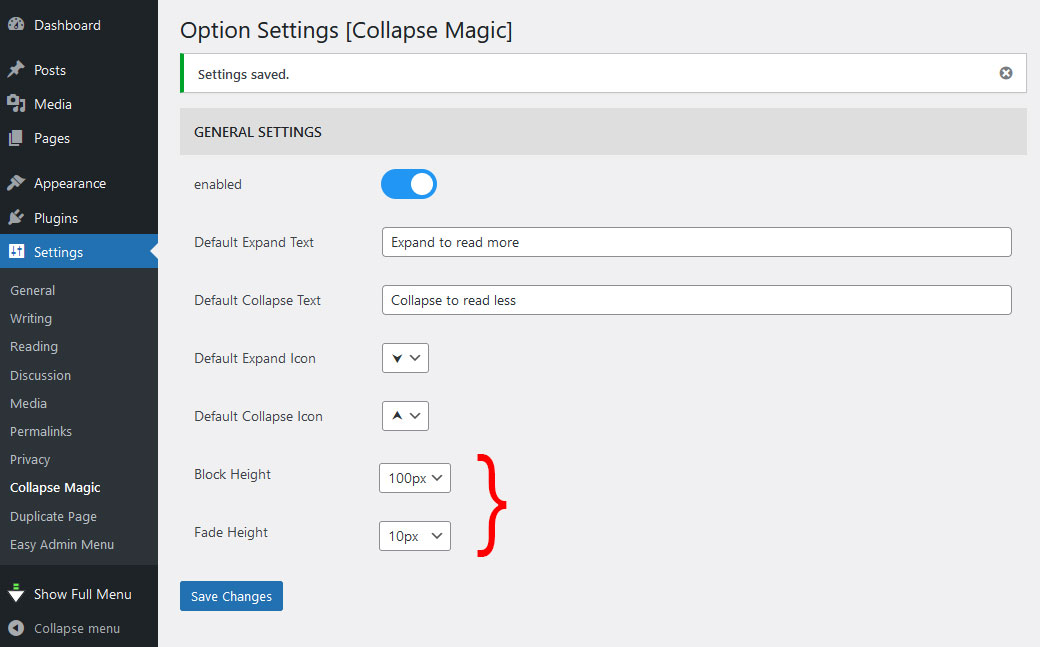
Changing the block height and the fade height changes the way the text is displayed.

The content display fades to the read-more link when the Block Height and Fade Height values are increased.
FAQ
Yes, the plugin is theme independent.
Yes, the settings can be configured from the styling page.
Click on Collapse Magic option on the WordPress ‘Settings’ admin menu.
We make every effort to ensure that all the WordPress guidelines are followed and that our plugins are optimised to perform well in all our tests.
Changelog
1.1.0
- Improvements to better meet WordPress Plugin requirements
1.0.1
- Launch version
0.0.1
- Pilot launch April 2024